Works AI Automation
Service Business Quote Builder
Turns a messy customer enquiry into a reviewed, priced quote and a scheduled job for a trades business.
Owners and office staff of small service businesses, starting with a painting company, who quote by hand today.
Shown as Brightcoat Painting, an invented business, on sample data.
What it solves.
Enquiries arrive as a few lines of text: "three bedrooms, walls only, two coats, some cracks, next month". Someone has to pull out the facts, ask for what is missing, price the job consistently and get a quote out before the customer moves on. The product uses a model to extract what was stated, leaves blank what was not, and hands off to deterministic pricing rules so every quote is explainable.
- 01 Enquiry
- 02 Extracted details
- 03 Priced quote
- 04 Customer accepts
- 05 Scheduled job
- AI-assisted intake
- Deterministic pricing rules
- Quote revisions and acceptance
- PDF generation
- Job scheduling
Try it in two to three minutes.
Follow the steps or explore on your own. Each step opens the demo at the right page, and the demo offers the same tour the first time you visit.
-
Step 1
Open the waiting enquiry
"Can you repaint three bedrooms? Walls only, two coats. There are a few cracks. We would like it done next month." Press Extract details.
-
Step 2
Review the extraction
Stated details land in a structured form. Paintable area, access and dates are flagged as missing rather than guessed. Create a quote from it.
-
Step 3
Supply measurements and options
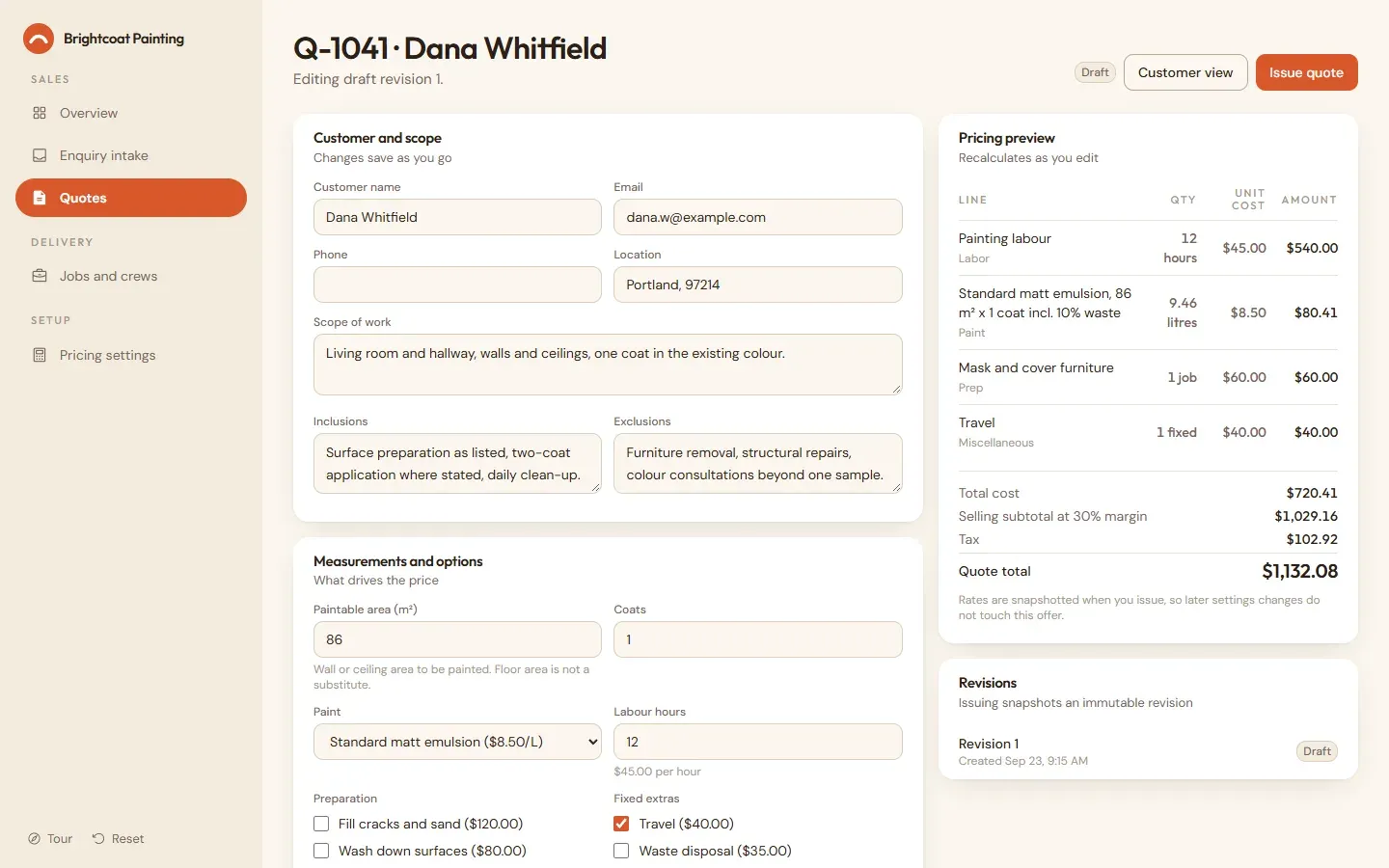
In the editor, enter the wall area, pick a paint, set labour hours and preparation. The preview prices as you type.
-
Step 4
Adjust the margin and issue
Move the margin slider and watch the totals reconcile, then issue the quote. Rates are snapshotted on the revision.
-
Step 5
Accept as the customer
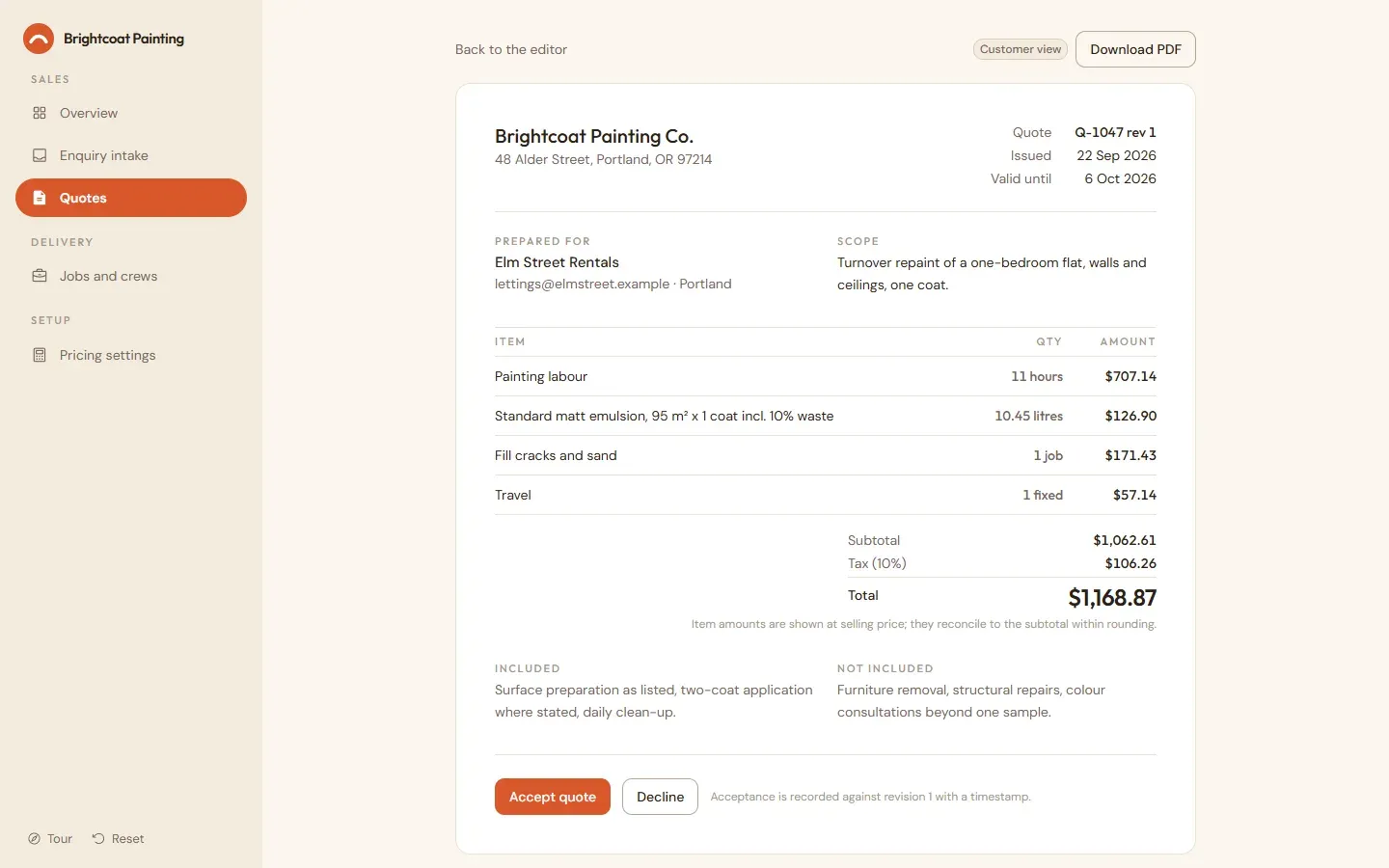
Open the customer view, download the PDF if you like, and accept the current revision. Exactly one job is created and the confirmation email is previewed in the activity feed.
-
Step 6
Schedule the job
Assign a date and crew. A crew already booked that day is rejected.
What’s on each screen.
-
Overview
Enquiry and quote counts, jobs awaiting scheduling, recent activity.
-
Enquiry intake
Sample enquiries, free-text entry, extraction result, missing information.
-
Quote editor
Customer, scope, measurements, line items, costs, margin, validity, totals.
-
Customer quote
Read-only current revision with inclusions and exclusions; accept or decline.
-
Jobs
Job list, details, date and crew assignment, status.
-
Pricing settings
Editable seeded labour and material rates, currency and tax rate.
What runs for real, and what doesn’t.
Nothing leaves the browser, and every name and figure in the demo is made up. A production build carries your brand and connects to your systems.
Runs for real
- Pricing is calculated with an explicit margin formula and rounding policy, and verified by automated tests.
- Issuing a quote snapshots rates and quantities so later settings changes cannot alter an existing offer.
- Repeated acceptance returns the same job rather than creating duplicates.
Simulated
- Bundled enquiries use saved extraction results and free text uses a rule set. Neither is a live model call.
- Confirmation emails are previewed in the activity feed and never sent.
- The PDF is the browser print of the customer quote.
A production build adds
- Actual email delivery
- Legally binding e-signatures and deposits
- Accounting integrations
- Route optimisation and crew capacity planning
- Measurement extraction from drawings or photos
- A live model call for extraction, run server-side with structured output validation
Have a workflow like this one?
Tell us how close it is, and what your business actually needs. The first session is free and thirty minutes.
Or see the other products we’ve built.