Works Custom Apps
Recruitment Analytics
Gives a recruitment agency one place to watch its numbers, run the team scoreboard and work its open jobs.
Agency leadership who want the whole business on one screen, and consultants who need their own numbers and their open roles.
Shown as Northwood, an invented business, on sample data.
What it solves.
A recruitment agency was paying for a scoreboard subscription that showed a handful of figures and nothing else. Revenue lived in the CRM, targets in a spreadsheet, outreach in two more tools, and nobody could answer "how are we doing this month" without opening four tabs. This demo re-creates the internal workspace that replaced all of that: a synced view of the CRM with a TV-friendly scoreboard, plain-English KPIs, target attainment and the day-to-day delivery tooling.
- 01 CRM mirror
- 02 Scoreboard
- 03 Headline KPIs
- 04 Revenue vs target
- 05 Jobs and outreach
- Analytics dashboards
- Colour-tiered team scoreboard
- KPI definitions with explainers
- Target attainment
- Job tracker with generated outreach copy
- Role-based settings
Try it in about three minutes.
Follow the steps or explore on your own. Each step opens the demo at the right page, and the demo offers the same tour the first time you visit.
-
Step 1
Sign in as an admin
Any email and password work. Pick the Admin role so the settings controls are unlocked.
-
Step 2
Read the scoreboard
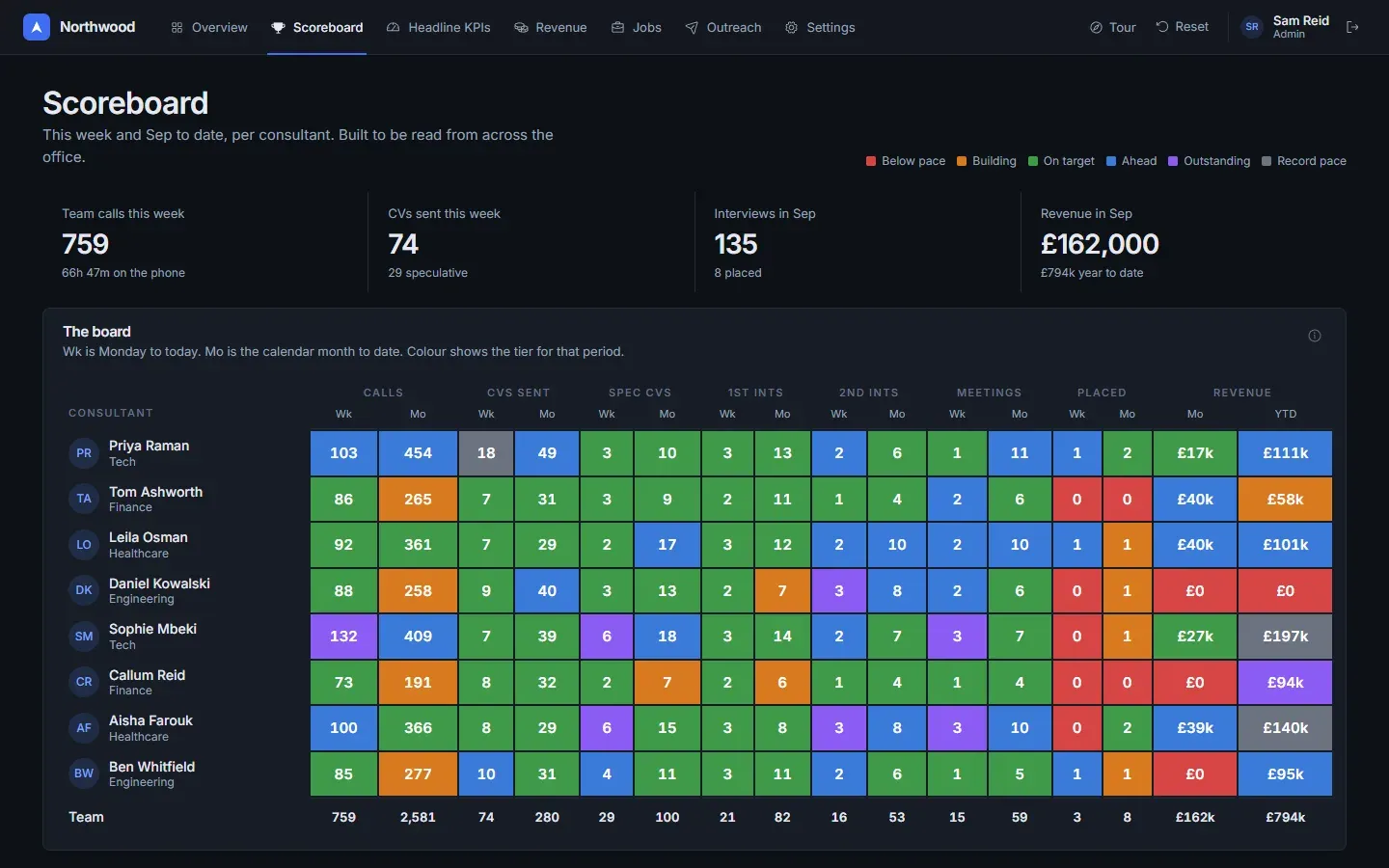
Each cell is filled with its tier colour so it reads from across the office. Hover a cell to see the tier name.
-
Step 3
Switch the KPI range
Change from last month to last quarter and watch the twelve KPIs and their deltas recompute. Open an "i" to see what a number counts.
-
Step 4
Check target attainment
The gauge compares won revenue with the target prorated to today, then breaks it down by department and consultant.
-
Step 5
Open a job
Click any row to see the brief, the generated outreach opener and the shortlist. The PDF and email buttons show a notice instead of sending anything.
-
Step 6
Hide a page
Turn off Outreach in Settings and watch it leave the navigation. Reset from the header when you are done.
What’s on each screen.
-
Overview
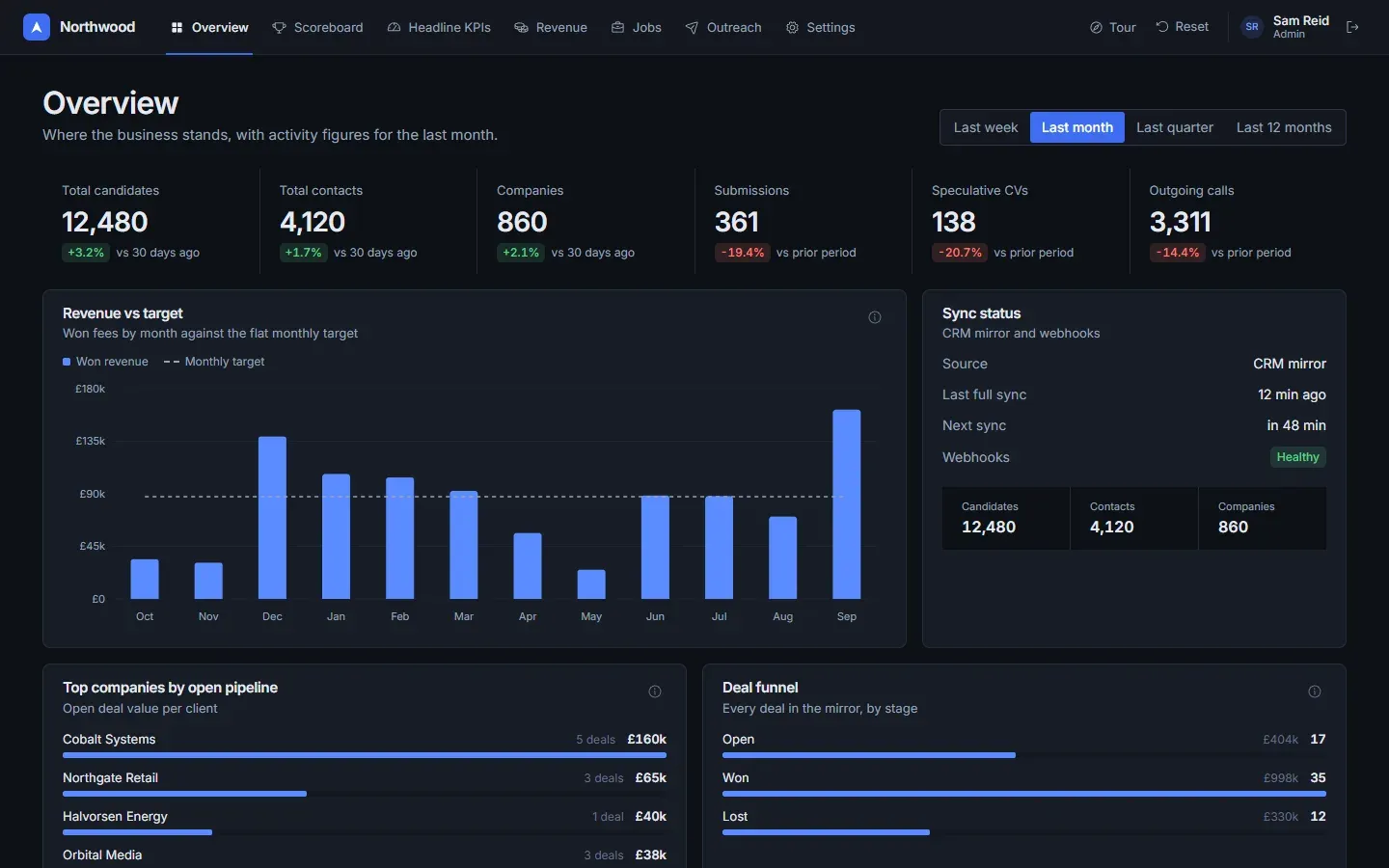
Hero figures with period deltas, revenue vs target, deal funnel, top clients by open pipeline, sync status and a chase list.
-
Scoreboard
Current week and month per consultant, every cell coloured by one of six tiers, plus revenue this month and year to date.
-
Headline KPIs
Twelve KPIs grouped by activity, pipeline and outcome, each with a what / source / caveat explainer and a per-consultant table.
-
Revenue
Attainment gauge, cumulative trend, by-department and by-consultant target bars, deals closing soon.
-
Jobs
Searchable tracker with a detail drawer: client brief, outreach copy and shortlist.
-
Outreach
LinkedIn and email funnels, weekly reply-rate trend and the campaign table.
-
Settings
Role, page visibility that hides navigation items live, consultant visibility, reset.
What runs for real, and what doesn’t.
Nothing leaves the browser, and every name and figure in the demo is made up. A production build carries your brand and connects to your systems.
Runs for real
- Every chart, tile and table is computed in the browser from the seeded data set.
- Time-range and consultant pickers recompute KPIs and deltas against the previous period.
- Page and consultant visibility changes apply immediately and survive a refresh.
- Role changes lock and unlock the admin-only controls.
Simulated
- The CRM sync status is a fixed label. Nothing is fetched from a CRM.
- Outreach copy is sample text, not a live model call.
- Shortlist PDF export and email buttons show a notice instead of sending anything.
- Consultants, clients, candidates and every figure are fictional.
A production build adds
- Hourly CRM sync plus webhooks into a Postgres mirror, with the sync status panel reporting real timings.
- Sign-in with named accounts and the master / admin / member roles enforced on the server.
- Branded PDF generation for shortlists and CVs, and interview confirmation emails.
- LinkedIn and email outreach tools feeding the funnels, and a server-side model adapter writing the outreach copy.
- Holiday requests with Slack alerts, fee-rate management and an audit log.
Have a workflow like this one?
Tell us how close it is, and what your business actually needs. The first session is free and thirty minutes.
Or see the other products we’ve built.